
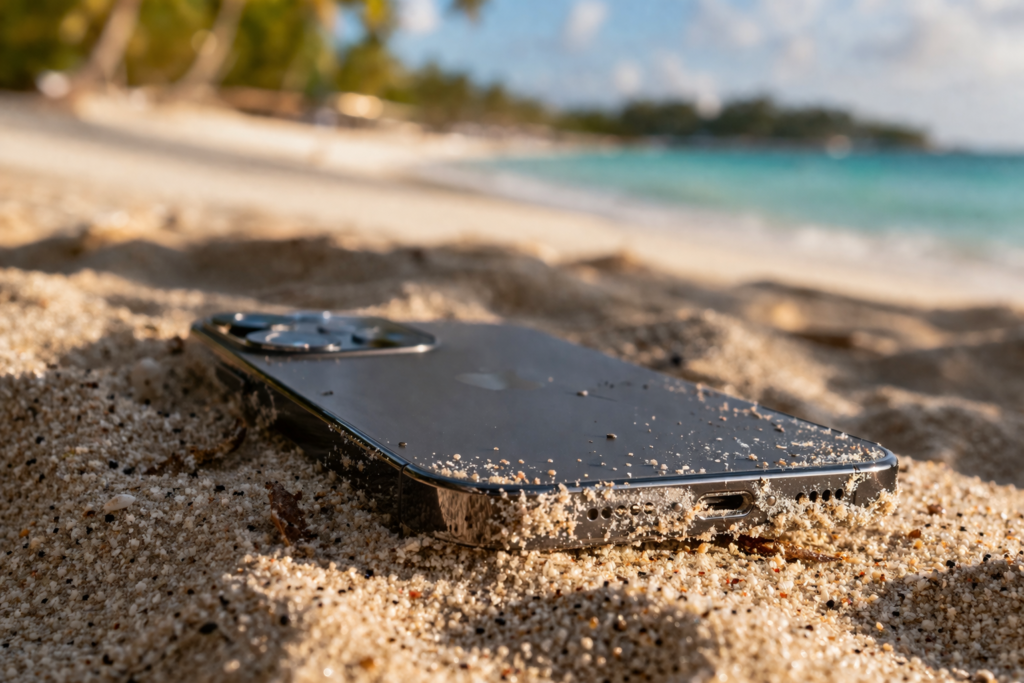
If you live in Miami, your phone goes to the beach with you. It rides in your pocket from South Beach to Key Biscayne, sits on a towel next to your sunscreen, and gets passed around for group photos with sandy fingers. Most people shake it off, blow into the charging port, and assume that’s the end of it. But after years of opening up devices behind the bench, I can tell you that beach sand phone damage in Miami is one of the sneakiest problems we see all summer long. The grains are too small to brush away completely, and what looks like a clean port under the naked eye usually isn’t. By the time a customer walks in saying their phone “won’t charge anymore” or “the speaker sounds weird,” there’s almost always sand involved. This blog walks through what actually happens inside your device when beach sand gets in, what we see under magnification at the shop, and how to keep a fun day on the sand from turning into a $300 repair bill.
Section 1: Why Beach Sand Is So Much Worse Than Regular Dust
People think of sand as an annoyance, like crumbs in a keyboard. The reality is closer to tiny shards of glass. Beach sand in South Florida is mostly quartz and broken shell fragments, and a single grain measures roughly 0.1 to 2 millimeters across, which is more than enough to wedge itself permanently inside a Lightning or USB-C port. Unlike household dust, quartz has a hardness of 7 on the Mohs scale, harder than the gold-plated contacts inside your phone’s connectors. When you push a charging cable in over sand, you’re essentially grinding microscopic glass against the pins.
According to the National Oceanic and Atmospheric Administration, most beach sand also contains salt residue and trace minerals from seawater, which is the second half of the problem. Even after the visible sand is gone, salt crystals can remain inside your device, drawing in humid Miami air and slowly corroding internal components. This is why a phone can seem fine for two weeks after a beach trip and then suddenly stop charging out of nowhere.
The bottom line: a single afternoon at Haulover Beach can leave behind enough abrasive material and salt to start damaging your phone before you even get home.
Section 2: What We Actually See Under Magnification
Charging Ports Full of Compacted Grit
This is the number one issue we deal with at the shop during summer. When a customer brings in an iPhone for repair, the first thing we check is the port. Under a 10x loupe, we’ll often find a packed wall of sand grains shoved deep against the connector pins, sometimes mixed with pocket lint forming a kind of cement. The customer thinks they cleaned it. They didn’t. They pushed it deeper.
Scratched and Bent Connector Pins
Once sand is in the port and you keep plugging in a cable, those quartz grains scrape across the contacts. Over a few weeks, the gold plating wears off, exposing the copper underneath. Copper oxidizes fast in Miami humidity. That’s when you start seeing intermittent charging, where the cable only works at a specific angle or you have to wiggle it.
Speaker Mesh and Microphone Contamination
Sand doesn’t only enter through the port. It works its way into the earpiece grille and the bottom microphone openings. On Samsung devices, we frequently see customers complaining that callers sound muffled or that voice memos pick up a faint scratching noise. That’s almost always sand vibrating against the speaker diaphragm.
Camera Lens Scratches
A grain of sand caught between a phone case and the rear camera glass can leave a permanent scratch the first time you slide the phone into your pocket. We see this constantly on phones that came back from a beach day still wearing the same case they went out in.
iPad and Tablet Damage from Beach Bags
It isn’t only phones. Plenty of iPad repairs we handle in July and August come from tablets that lived in tote bags alongside flip-flops, sunscreen bottles, and damp towels. Sand at the bottom of the bag finds its way into the speaker cutouts and the USB-C port, and the moisture from wet towels accelerates the corrosion.
Game Console Vents Clogged with Beach Debris
You’d be surprised how often this happens. Portable consoles like the Nintendo Switch get tossed into beach bags for the kids, and a few days later they’re overheating because sand has packed the cooling vents. We handle game console repairs like this almost weekly during the summer months.
Section 3: How to Keep Sand From Wrecking Your Device (Real Advice)
I’m not going to tell you to leave your phone in the car. Nobody does that, and you’d just worry about it the whole time. Here’s what actually works, based on what I tell every customer who walks in with a sand-related issue:
Bring a small zip-top bag. Not a fancy waterproof pouch, just a basic snack-size plastic bag. Slip the phone in when you’re not using it. It costs nothing, and it stops 95% of sand and salt spray from ever reaching the device.
Never blow into the charging port. This is the most common mistake people make. Your breath is full of moisture, and you’re pushing sand deeper at the same time. If you must clear something out, hold the phone port-down and tap it gently against your palm.
Skip the toothpick. I’ve seen so many customers come in with bent connector pins because they tried to dig out sand with a wooden toothpick or, worse, a sewing needle. Once those pins are bent, the only fix is a full charging port replacement.
Rinse your hands before handling the phone. Sounds obvious, but this single habit prevents most camera lens scratches and speaker contamination.
Don’t put a sandy phone back in its case. The case traps grains against the frame and creates pressure points. Wipe both the phone and the inside of the case down with a dry microfibre cloth before reassembling.
Get it checked early. If your charging cable is starting to feel loose, or your speaker sounds even slightly off, bring it in. A quick port cleaning is cheap. A motherboard repair after corrosion has spread is not. You can request a free quote online before you even come in, and most cleanings are done the same day.
If your phone has already taken a direct hit of seawater, do not plug it in to test it. Power it off, leave it off, and bring it to a technician immediately. Charging a wet phone is one of the fastest ways to short out the logic board.
Section 4: Conclusion and Final Thoughts
Beach sand phone damage in Miami isn’t a myth, and it isn’t rare. Every summer, repair benches across the city fill up with phones, tablets, and consoles that came back from the shore looking fine but slowly stopped working over the following weeks. Almost all of it traces back to the same handful of causes: abrasive grains grinding inside ports, salt residue corroding contacts in humid air, and well-meaning owners making the damage worse by trying to clean things out at home.
The good news is that nearly all of this is preventable with small habits, and most of it is repairable if you catch it early. A loose charging cable today is a $40 fix. The same problem ignored for a month is often a $250 board-level repair. If you’ve noticed anything off with your device after a recent beach trip, don’t wait it out. Stop by WEGOWEFIX in Miami, give us a call, or grab a free diagnostic, and we’ll take a proper look under magnification. We’ve cleaned out enough sand to fill a sandbox at this point, and we’d much rather help you avoid the bigger bill.
FAQs
Can sand really destroy a phone, or am I overthinking it?
Yes, it really can. Beach sand is mostly quartz, which is harder than the gold plating on your charging connector. Even a few grains can scratch contacts and trap salt that corrodes the port over time.
My phone charged fine after the beach. Am I in the clear?
Not necessarily. Salt and sand damage often shows up two to three weeks later, once humidity has had time to draw moisture into the port. If anything starts feeling off, get it checked.
Is it safe to use compressed air to clean out my charging port?
A short, gentle burst from a proper electronics duster can help, but high-pressure cans can blow grains deeper or damage the port pins. Tapping the phone gently port-down is usually safer.
My speaker sounds scratchy after a beach day. Will it fix itself?
Usually not. Sand caught against the speaker diaphragm needs to be physically removed by a technician. Continuing to use the speaker can permanently damage it.
Are waterproof phones safe at the beach?
“Water resistant” ratings are tested with fresh water, not saltwater, and not with sand. The seals also degrade over time. Treat any IP rating as a backup, not a guarantee.
Disclaimer: This article is for informational purposes only and reflects common issues observed at Miami repair shops during summer months. If your device has been exposed to seawater or shows signs of liquid damage, please stop using it and consult a qualified repair technician before attempting any fixes yourself.